

Why Businesses Are Moving to Azure And How to Know If You're Ready
For years, moving business operations to the cloud was seen primarily as an IT upgrade. Today, cloud adoption, especially with Microsoft Azure, is driven by fundamental business priorities: lowering hardware costs, improving data security, enabling remote work, and unlocking artificial intelligence.
As physical servers age and license agreements come up for renewal, many organizations are asking: Is it time to move to Azure, or should we keep our servers on-site?
Here is a plain-English look at why so many growing companies are making the switch to Microsoft Azure, along with a practical checklist to help you determine if your business is ready.
The Top 3 Reasons Businesses Choose Microsoft Azure
While there are several major cloud providers, Microsoft Azure remains one of the most popular choices for mid-market and enterprise businesses. Here is why:
1. Seamless Integration with Tools You Already Use
If your team relies on Microsoft 365 (Outlook, Teams, SharePoint, Word, Excel), Azure acts as a natural extension of your existing setup. Employee accounts, access permissions, and file sharing connect smoothly without forcing staff to learn entirely new software systems.
2. Predictable Costs Instead of Massive Server Upgrades
Purchasing, hosting, and maintaining physical servers requires significant up-front capital investments every 3 to 5 years. With Azure's pay-as-you-go model, businesses trade unpredictable hardware replacement costs for manageable, operational monthly expenses that scale up or down based on actual usage.
3. Built-In AI & Advanced Security
Azure comes integrated with enterprise-grade security tools like Microsoft Defender and Entra ID (formerly Active Directory), protecting sensitive business data against modern cybersecurity threats. Additionally, moving to Azure gives your company instant access to tools like Azure OpenAI Service, making it simple to add AI capability to your existing data.
Official Resource: Explore migration benefits and framework models on the official Microsoft Azure Cloud Adoption Framework.
Moving to Microsoft Azure brings enterprise-grade security tools under one umbrella, combining identity management, threat protection, and automated compliance.
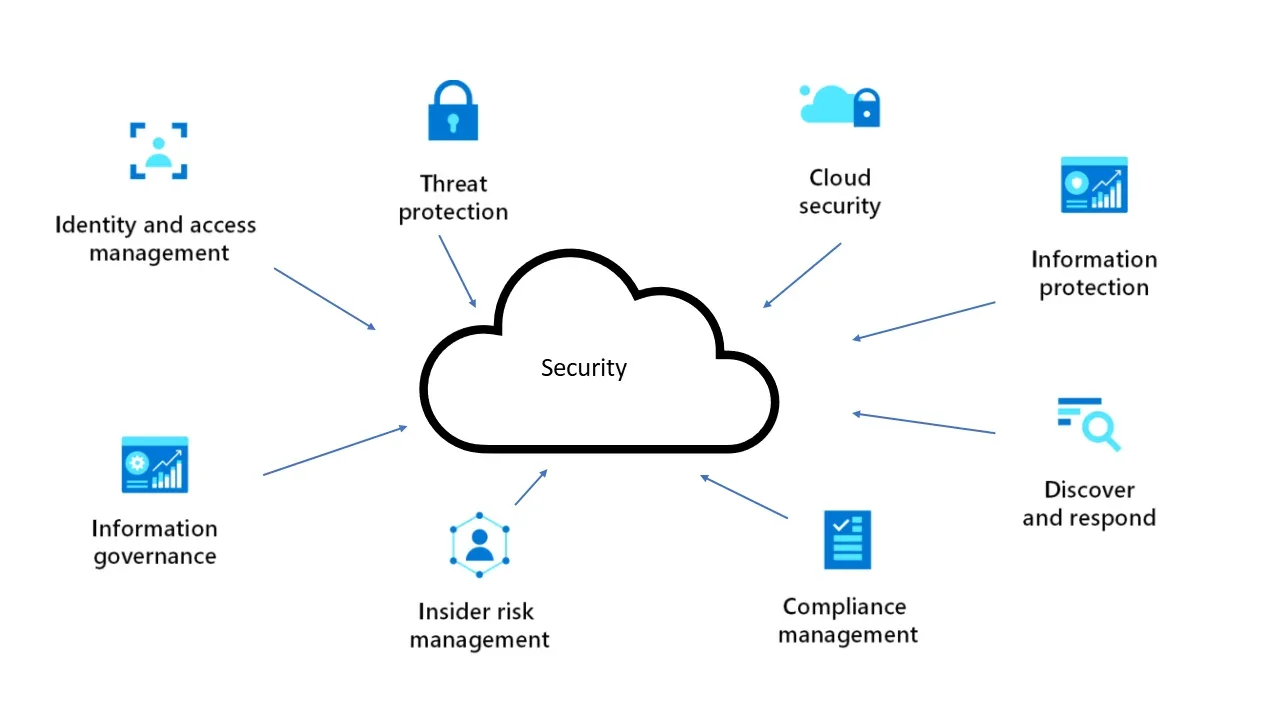
https://tech24online.com/why-are-these-three-azure-security-services-a-must-use/
5 Signs Your Business Is Ready for Azure
How do you know if your organization is at the right stage to transition to the cloud? Here are five common indicators:
- Your Physical Hardware Is Aging: Your local servers are approaching the 4- or 5-year mark, and warranty extensions or replacement costs are escalating.
- You Have a Hybrid or Remote Workforce: Employees struggle with slow VPNs or remote desktop tools when trying to access internal files and applications from outside the office.
- Disaster Recovery Concerns Keep You Up at Night: Your current backup setup relies on manual tapes, external hard drives, or single-location backups that could fail in a disaster.
- Software License Renewal Is Approaching: You are facing major license renewals for Windows Server or SQL Server, which can often be optimized or discounted when migrated into Azure.
- Data Security & Compliance Demands Are Growing: Clients or industry regulators are requiring stricter data privacy, multi-factor authentication, and audited access controls.
Step-by-Step: How a Typical Azure Migration Works
Azure Migrate provides detailed discovery dashboards, mapping existing database readiness and precise monthly cost estimates prior to migration.
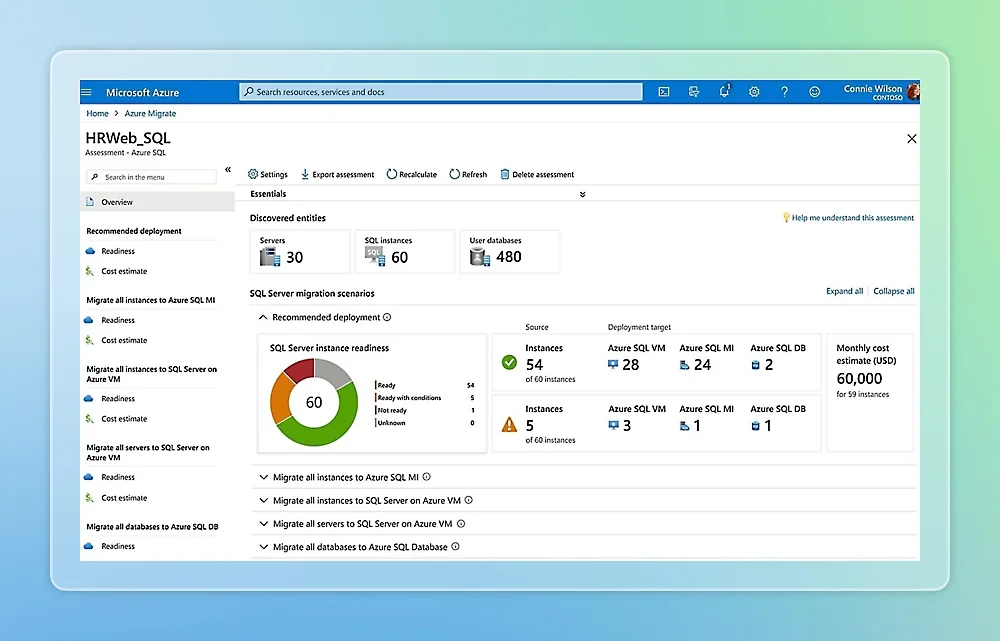
Moving to the cloud does not mean turning off your business for a weekend and hoping for the best. Modern Azure migrations follow a structured, low-risk process:
Step 1: Assessment & Discovery
Automated tools scan your current servers, software applications, and network usage to map out what you have and calculate exact monthly cloud costs before touching a single file.
Step 2: Proof of Concept
A small, non-critical environment (such as a staging server or backup repository) is built in Azure first. This allows your team to test performance and security without interrupting daily operations.
Step 3: Migration & Optimization
Data and applications are migrated in phases. Once live on Azure, ongoing performance is tuned to ensure you aren't paying for unused cloud storage or memory.
Official Resource: Learn about assessment tools in the Microsoft Azure Migrate Hub.
Traditional On-Premise vs. Microsoft Azure
Feature | On-Premise Physical Servers | Microsoft Azure Cloud |
Capital Expenses | Large up-front costs every 3–5 years. | Predictable monthly operating expense. |
Remote Access | Requires slow VPNs or complex setups. | Secure, direct access from anywhere. |
Scaling Capacity | Requires buying and installing new hardware. | Scale storage or computing power in clicks. |
Disaster Recovery | Manual, vulnerable to physical disasters. | Automated, multi-region geographic backups. |
Taking the First Step
Cloud migration is not an "all-or-nothing" decision. Many businesses adopt a hybrid approach, keeping certain local systems in place while moving critical databases, backups, and applications to Azure at a pace that fits their operations.
Curious about what moving to Azure would look like for your company?
Contact GigaSphere today to request an Azure Cloud Readiness Assessment and receive a customized migration roadmap for your team.