

How to Keep Your Cloud Costs Under Control on Azure: A Practical Checklist
When businesses move to Microsoft Azure, the initial benefits are clear: agility, remote accessibility, enterprise security, and freedom from aging server hardware. However, as cloud adoption grows across departments, many organization leaders encounter an unwelcome surprise, a monthly cloud bill that is higher than expected.
In the industry, this is often called "Cloud Shock." It rarely happens because Azure is inherently expensive; rather, it occurs when resources are left running idle, over-provisioned, or unmonitored.
Managing your cloud budget does not require a background in software engineering. Here is a practical, non-technical checklist to help your leadership team optimize Azure costs and keep monthly spending completely predictable.
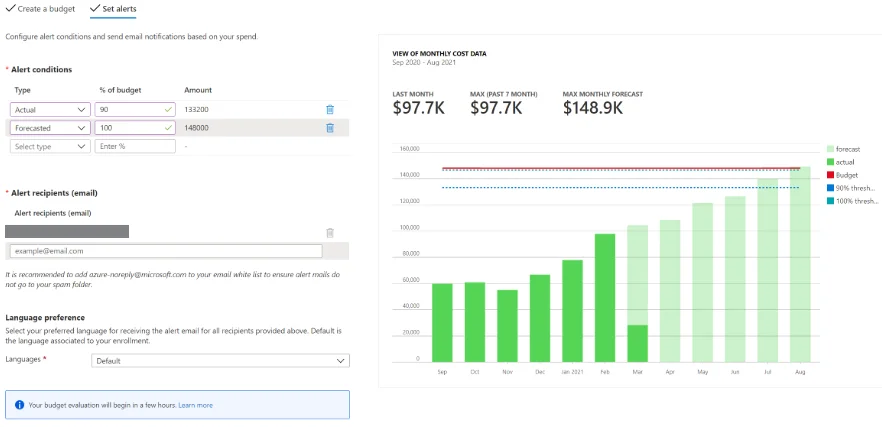
Proactive cost management eliminates idle resources and keeps your monthly Azure spending predictable.
https://www.prosperops.com/blog/microsoft-azure-cost-analysis/
Why Cloud Costs Spurt And How to Prevent It
Unlike traditional physical servers, where you pay a flat up-front fee regardless of how much processing power you use, cloud infrastructure operates on a pay-as-you-go model.
If a team sets up a virtual machine for a temporary project and forgets to turn it off, Azure continues billing for that resource 24 hours a day, 7 days a week. Over a few months, those forgotten resources can quietly add up to thousands of dollars in wasted operational budget.
The Executive Azure Cost Optimization Checklist
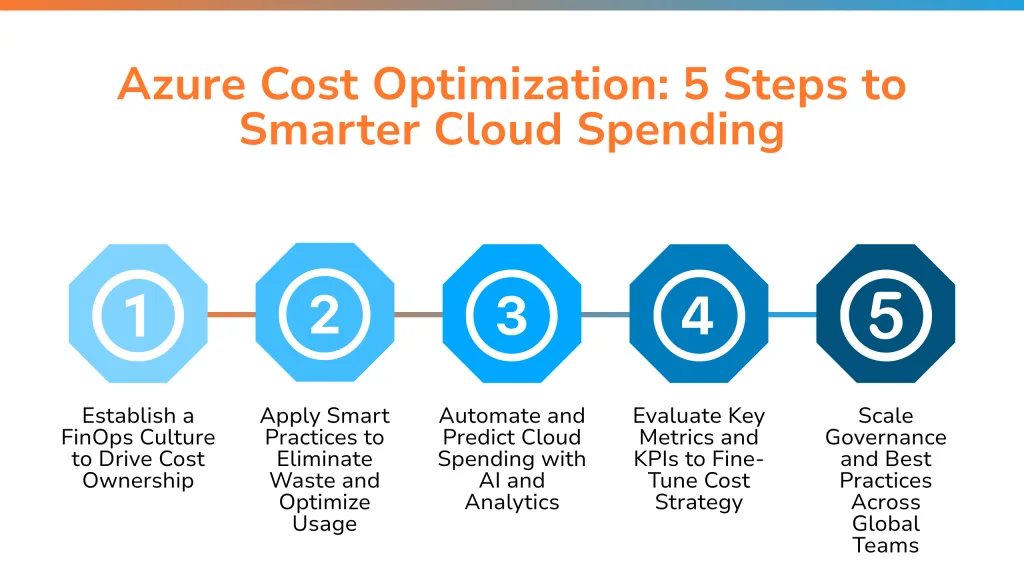
Use this 5-step checklist during your quarterly management reviews to ensure your business only pays for the cloud resources it actually needs.
1. Identify and Shutdown "Zombie" Resources
- The Problem: Test environments, temporary developer servers, or old storage accounts created for completed projects are left running indefinitely.
- The Fix: Conduct a quarterly audit to locate idle virtual machines. Set automated schedules to shut down non-production servers during non-business hours (e.g., nights and weekends). This single step can reduce running costs for test environments by up to 60%.
2. Right-Size Over-Provisioned Infrastructure
- The Problem: IT teams often default to purchasing larger, more expensive cloud servers "just in case" workloads spike, leaving resources running at less than 10% capacity.
- The Fix: Use built-in monitoring tools to analyze real performance needs. Shrinking a virtual machine from a large tier to a medium tier instantly cuts its cost in half without impacting daily employee productivity.
Official Resource: Learn how Microsoft provides automated right-sizing recommendations in the Microsoft Cost Management Guide.
Following a structured checklist ensures your business captures maximum cloud ROI without budget surprises.
https://b-eye.com/blog/azure-cost-optimization-guide/
3. Take Advantage of Azure Reserved Instances
- The Problem: Paying standard "pay-as-you-go" hourly rates for servers that run constantly (like your core database or main company intranet) is the most expensive way to buy cloud capacity.
- The Fix: If you know your business will need a specific server for 1 to 3 years, commit to an Azure Reserved Instance. Microsoft offers discounts of up to 72% compared to standard pay-as-you-go pricing in exchange for a predictable, long-term commitment.
4. Set Hard Budget Alerts & Anomaly Notifications
- The Problem: Discovering a cloud cost spike when the invoice arrives at the end of the month leaves no room for proactive adjustments.
- The Fix: Configure Azure Cost Alerts. You can establish monthly spending caps for individual departments (e.g., Marketing, Sales, Operations). If a department reaches 80% of its allocated budget mid-month, automated notifications alert managers so they can investigate immediately.
Official Resource: Explore how to build automated budget notifications using Azure Budgets & Cost Alerts.
5. Enforce Strict Access & Deployment Permissions
- The Problem: When too many employees have administrative permission to create cloud assets, uncoordinated spending can quickly get out of hand.
- The Fix: Implement strict role-based access controls through Azure Resource Manager. Ensure that only designated lead personnel or your managed service partner have permission to spin up new paid services.
Quick-Reference Summary: Savings Opportunities
Optimization Strategy | Typical Impact | Implementation Effort |
Off-Hours Auto Shutdown | Up to 60% savings on test/dev environments | Low (One-time rule setup) |
Azure Reserved Instances | Up to 72% savings on core workloads | Low (Financial commitment) |
Server Right-Sizing | 20%–40% reduction in monthly computing bills | Medium (Performance review) |
Automated Budget Alerts | Prevents 100% of unexpected billing spikes | Low (Immediate visibility) |
Maximize Your Cloud ROI
Cloud cost control isn't about restricting growth or underpowering your operations, it's about ensuring every dollar you spend on Microsoft Azure delivers real business value. By reviewing your environment regularly and automating basic safeguards, you can maintain high performance while keeping your budget under control.
Want to reduce your monthly cloud spend without impacting performance?
Contact GigaSphere today to schedule a comprehensive Azure Cost Optimization Audit and discover immediate savings opportunities for your organization.