

How to Clean and Prepare Your Business Data for AI using Databricks (Step-by-Step)
When business leaders talk about deploying artificial intelligence, the conversation usually focuses on exciting new models, smart tools, or time-saving automated assistants. But behind every successful AI project lies a less glamorous truth: AI is only as smart as the data you feed it.
If your business data is scattered across duplicate spreadsheets, full of missing customer details, or formatted inconsistently, feeding it into an AI tool will produce inaccurate reports and unreliable answers.
Preparing your data isn't just a technical task, it is an essential business investment. Here is a simple, non-technical guide to how platforms like Databricks help organizations turn raw, messy information into clean, AI-ready assets.
The Medallion Framework organizes raw data into trustworthy insights in three clear stages.
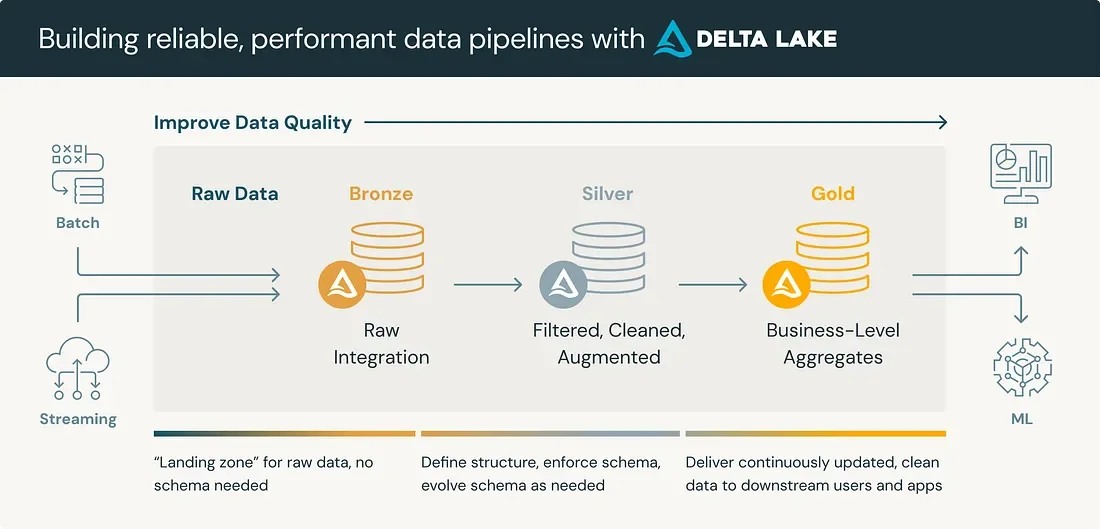
The 3-Stage "Medallion" Framework: Organizing Your Data
Databricks uses an intuitive concept called the Medallion Architecture to take data from its rawest form to a state where AI models can safely consume it. Think of it like refining crude oil into high-grade fuel:
- Bronze (Raw Data): Your data is gathered exactly as it is, unfiltered spreadsheets, raw export files, customer receipts, or application logs.
- Silver (Cleaned & Validated Data): Duplicates are removed, missing fields are handled, and formats (like date styles or currency symbols) are standardized.
- Gold (Business & AI Ready): Clean data is aggregated into high-value summaries, ready to power business intelligence dashboards or train AI assistants.
Why this matters for your business: Instead of spending hours manually cleaning spreadsheets before every project, your company maintains an automated pipeline that keeps your information AI-ready around the clock.
Step-by-Step: Preparing Your Data in Databricks
You don't need a degree in data science to understand how data preparation works. Here is the step-by-step process your organization can follow using Databricks:
Step 1: Connect Your Data Sources
First, bring your isolated data streams into one central hub. Whether your team relies on customer records in a CRM, transaction history in accounting software, or inventory files on local cloud drives, Databricks connects to these sources without requiring you to manually export and upload files every week.
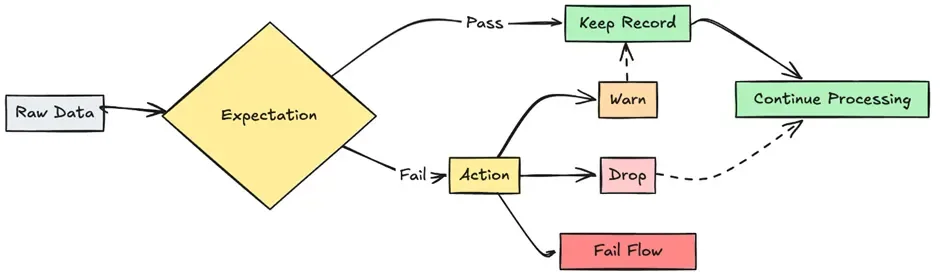
Step 2: Set Built-In Quality Rules (Expectations)
Instead of manually hunting for errors in a 10,000-row spreadsheet, Databricks uses Delta Live Tables to enforce automatic quality rules.
You can set simple business expectations, such as:
- "Every customer record must have a valid email address."
- "Order totals cannot be a negative number."
- "Phone numbers must follow a standard 10-digit format."
If incoming data breaks these rules, Databricks automatically flags or quarantines those records so flawed entries never pollute your AI tools.
Reference Link: To see how automated data pipelines enforce quality checks, explore the Databricks Delta Live Tables Guide.
Automated quality checks prevent corrupted data from reaching your downstream AI models.
Step 3: Secure Your Sensitive Information
Before handing data over to an AI system, you must protect private records like social security numbers, credit card details, or sensitive payroll figures.
Through Databricks Unity Catalog, administrators can set up automated column masking and access controls. This means an AI tool assisting your marketing team can analyze customer purchasing habits without ever seeing private payment information.
Reference Link: Learn more about unifying permissions and data protection across your company in the Databricks Unity Catalog Overview.
Step 4: Feed Your Data into AI Models
Once your data reaches the Gold standard and access rules are enforced, your business can confidently connect AI tools:
- Internal Search Assistants: Employees can ask questions like "What were our top 3 best-selling products in Q2?" and receive immediate, accurate answers pulled from your validated data.
- Predictive Analytics: Business leads can forecast sales trends or inventory needs based on reliable historical numbers rather than guesswork.
Real-World Example: Customer Support Automation
Imagine a retail company that wants an AI agent to draft responses to customer inquiry emails.
- Without Data Prep: The AI pulls from outdated spreadsheets containing incorrect product prices and old return policies. It sends incorrect information to customers, causing confusion and refund disputes.
- With Databricks Data Prep: The AI accesses clean, real-time product catalogs and updated policy files managed through Delta Live Tables. The AI drafts accurate responses every single time, saving support agents hours of manual work.
Getting Started
Preparing your business data for AI does not require a massive, multi-year overhaul. By focusing on your most critical data sources first and establishing simple quality rules, you can quickly create a trusted data foundation that drives real productivity gains.
Unsure if your business data is ready for AI?
Contact GigaSphere today to schedule a data health assessment and learn how we can help you build an automated, secure data pipeline.